
What?
In this project I will showcase how I set up an integration between Unreal Engine 5 and Ableton Live 11. Allowing UE to trigger MIDI events and control track parameters in realtime.
Why?
I had seen examples of people controlling UE with Live, I wanted to see what was possible when you attempt the reverse. I was also curious how much of a ‘game audio’ experience I could create using just one Ableton Session.
How?
This was mostly achieved through a custom Max For Live Audio Device, and utilization of the Unreal Engine 5 OSC plugin.
If you would like to check out the GitHub repository for this project, it is available Here!
WARNING: I’ve provided the link for people to review the code and M4L Devices. There is a lot of custom setup required to make the integration functional, so downloading the repo and running it may have mixed results!
Aim
The aim of this project was to finish with an Ableton Session that could play and spatialise sounds as if they were running live in the Unreal Engine game world. Everything should to be updated in real time and the player should be able to trigger sounds via animations, collision, gameplay events etc. Implementation on the Unreal Engine side should be straightforward and seamless, with a robust interface to communicate with Ableton.
Constraints
Naturally, Ableton is not game audio middleware (even if I was trying to force it to be). It uses tracks instead of voices, and the panning and gain control sliders (and underlying float / integer values) are intended for mixing music in stereo, not realtime spatialising real-time audio. Consequently there were a few constraints to the project.
- When playing sounds in a Game Audio engine, the audio engine will allocate voices to those sounds, let the sound play; then free up the voice when it’s finished. The whole system is designed to be very flexible to account for the unpredictable nature of gameplay. In Ableton, you just have tracks. There isn’t a way to dynamically create and remove tracks so everything has to be preset and predefined at the start. Consequently, in my game it’s one emitter per track and one sound instance per emitter (essentially monophonic). All tracks and emitters are pre-assigned in advance with an individual address to ensure that messages are always going to the right place.
I did look at implementing a pooling system which would treat all the tracks like a pool of voices, allowing audio events to simply use the first available voice. However this felt a bit out of scope for the project. Maybe I’ll look at that in the future. - Sound spatialisation occurs by mapping a Unreal panning parameter to the pan control on each track. This works fabulously for the most part with some exceptions. The track pan control is a dial, not an absolute float value like you may have in a game audio engine. This means that flipping the pan from 0 to 1 (left to right) is not instantaneous, it requires stepping through 0.1, 0.2, 0.3 etc. This can produce slightly unsual sounding panning whenever any sound is quickly flipping between hard left and hard right.
Hello, World!
The first step was to get some communication going between Unreal Engine and Ableton. I knew I wanted to do this with OSC (Open Sound Control), it’s a network protocol designed for sending audio messages between audio hardware and software and both Ableton and UE5 have methods of sending and receiving OSC messages.
In Ableton, I made a Max for Live device which listens for UDP messages on a given port. The device checks the address of the message for the data type it is receiving e.g. /midi /panning /attenuation. Those values are then displayed as output parameters, which can be mapped to the track controls, or just displayed for debug purposes.
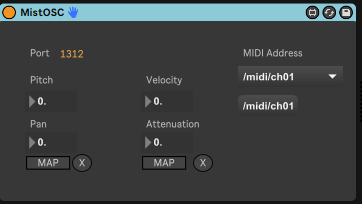
On the UE5 side, I created a OSCTransmitter class, which spawns an OSC Client. With that OSC Client we can set an adress to send to, and add values to the message for Ableton to interpret. That looks like this:
//Create the OSC client
FString localHost = "127.0.0.1";
FString clientName = "AbletonOSCClient";
OSCClient = UOSCManager::CreateOSCClient(localHost, 1312, clientName, this);
bool AOSCTransmitter::SendOSCInt(int32 intToSend, FString address)
{
if (!OSCClient) { return false; }
if (!OSCClient->IsActive()) { return false; }
FOSCMessage message;
FOSCAddress oscAddress = UOSCManager::ConvertStringToOSCAddress(address);
message.SetAddress(oscAddress);
UOSCManager::AddInt32(message, intToSend);
OSCClient->SendOSCMessage(message);
return true;
}With that, I was able to fire OSC messages from the UE5 game and see Ableton picking them up via my custom Ableton Live Device. I added an OSC Susbsytem class that operates the transmitter, so then I could send these OSC messages from anywhere in the Unreal Game.
Let there be MIDI
Good news! MIDI messages are just numbers, and we can already send numbers. So I just had to do that in a user friendly way.
I created a ENUM class with values for each MIDI note from 0 – 127. This meant I could script the game to play notes in a more ‘musical’ way without having to go and lookup the MIDI value for C#_4 every time I wantd to play an A Major Chord. To send a MIDI note, we just cast the ENUM to it’s integer value, and fire it over to Ableton along with a velocity value.

Time To Spatialize
If I wanted to be able to attach sounds to game objects and spatialize them, it made sense to let that all be handled by a Unreal Scene Component. Components are little attachments that you can add to game objects to add specific functionality; so I made a OSC Emitter Component. To spatialize the sound we need to adjust the track gain to convey the attenutation of the sound; and adjust track panning to convey the positioning of the sound.
Calculating the attenuation is done by comparing the current distance between the emitter (OSC Component) and listener (Camera Component) and applying that as a percentage of the max attenuation distance (how far away the object can be before it is silent).
Calculating the panning is achieved by getting the angle between the emitter and listener, and using Trigonometry to convert that to a panning value.
Anything else?
I added some helpful extras like a custom AnimNotify class, which let me play MIDI messages easily in animation sequences; and a OSCTrigger class which uses a box collider to play/stop a MIDI message when the player Enters/Exits the collider.
Feel free to check out all the code at www.github.com/wcFactory/UE-Live
 mistaudio.com